
Web Hosting Cymru
  • 0 Shopping Cart
  • Home
  • Store
    • Browse All
    • Web Hosting
    • Plesk Hosting
    • WordPress Hosting
    • Reseller Hosting
    • Plesk Reseller Hosting
    • VPS Hosting
    • SSL Certificates
    • Website Builder
    • Website Security
    • VPN
    • Register a New Domain
    • Transfer Domains to Us
  • Announcements
  • Knowledgebase
  • Network Status
  • Contact Us
  • More
  • Account
    • Login
    • Forgot Password?
  1. Portal Home
  2. Knowledgebase
  3. Plesk Guides
  4. Restarting Apache on Plesk

  Categories

22
cPanel Guides
3
Dedicloud VPS
4
Domains
1
Billing
8
Email
1
FTP
5
General
2
Nameservers
13
Plesk Guides
6
SSL

  Categories

  Support

  My Support Tickets   Announcements   Knowledgebase   Downloads   Network Status   Open Ticket

Restarting Apache on Plesk Print

  • 0

Please note that only customers on a VPS can restart Apache and other services.


Log into Plesk, click on Tools & Settings
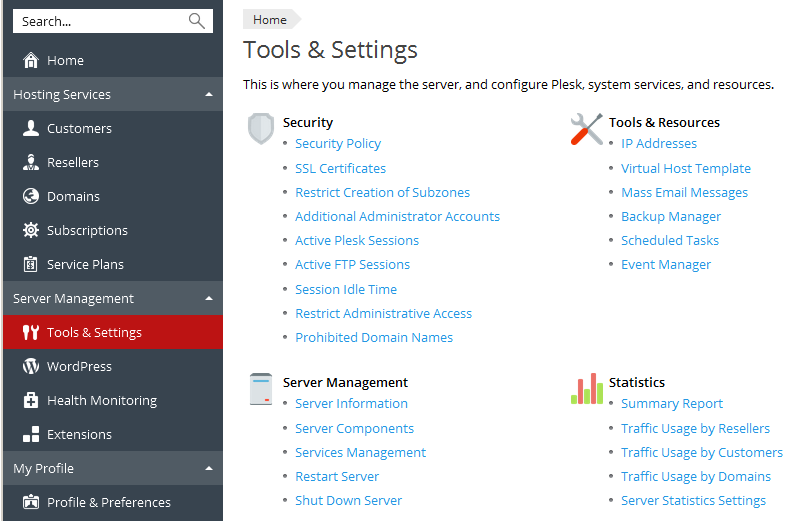
 

Step1


Click on Services Management


This will bring up a list of services, including Apache which may be at the top or bottom depending on the version of Plesk:

Step1


Click on the cog wheel on the right to restart Apache.


This banner will be displayed at the top of the page:

Step1


Was this answer helpful?

Related Articles

Accessing PHP Selector on Plesk Log into your Plesk control panel with your usual URL and Username/Password.NOTE: Resellers will... How do I use Google Apps / GMail for my e-mail accounts? If you want to use the Google Apps mail service to receive your e-mails, our system will support... How to access the Plesk control panel? To login to your Plesk Hosting account, go to https://cloudxx.webhostingcymru.co.uk:8443... How to check logs on Plesk Go to the Control Panel for the domain in Websites & Domains: Scroll down to Logs and... Magento - PHP Fatal error: Class 'Locale' installing fix Log into your Plesk control panel with your usual URL and Username/Password. Make sure you are...
« Back

  Support

  My Support Tickets   Announcements   Knowledgebase   Downloads   Network Status   Open Ticket
  • Contact Us
  • Terms of Service

Copyright © 2025 Web Hosting Cymru. All Rights Reserved.


Loading...
Loading...
Choose language
العربية
Azerbaijani
Català
中文
Hrvatski
Čeština
Dansk
Nederlands
English
Estonian
Persian
Français
Deutsch
עברית
Magyar
Italiano
Macedonian
Norwegian
Português
Português
Română
Русский
Español
Svenska
Türkçe
Українська

Choose Currency

£ GBP
$ USD

Generate Password

Please enter a number between 8 and 64 for the password length