
PHP2Shell: what the critical PHP flaws mean for your website
PHP fixed two critical flaws, known as PHP2Shell, on 21 October 2026 in PHP 8.2.35, 8.3.36, 8.4.27 and 8.5.12. On shared or reseller hosting, your host patches PHP, so you only need to make sure your site runs a supported PHP version. If you run your own server, install the update now. A security plugin won’t stop these flaws.
PHP2Shell is the name for two critical flaws in PHP itself, CVE-2026-109618 and CVE-2026-109619, which PHP fixed on 21 October 2026. They can let an attacker run their own code on a web server without logging in, and they affect every PHP installation that serves web requests until it’s updated to a fixed version.
Updated 22 October
On our shared and reseller hosting, patches are applied server-wide, so there’s nothing for you to install. Current status is on our server status page.
- cPanel shared and reseller: all PHP versions are patched, 5.6 included. A slightly lower number, such as 8.4.26, is still patched.
- Plesk shared and reseller: PHP 7.4 and newer are patched. If your site runs 7.3 or older, contact our support team now.
- Your own VPS: we updated most VPS servers where we had access, but check yours now. Our VPS steps show how.
Jump straight to the section for resellers, your own VPS or checking for signs of attack.
What PHP2Shell is
PHP’s security advisory confirms two separate flaws, both rated 9.2 out of 10. CVE-2026-109618 is in how PHP handles running out of memory while a request is still being set up. CVE-2026-109619 is internal state left behind by one request, which a later request on the same server process can reuse. Calif, one of the research teams that found them, named them PHP2Shell. The EU’s computer emergency response team, CERT-EU, describes the risk as unauthenticated remote code execution.
PHP says every installation serving web requests is at risk, including PHP-FPM, Apache with mod_php, php-cgi, FrankenPHP and LiteSpeed. It rates the risk highest for mod_php, where a demonstrated attack runs before any of your site’s code.
Attack attempts were reported on 21 October, the morning after news of the flaws leaked. Amazon has since said its honeypots recorded an attempt as early as 17 October, and that PHP2Shell is now being broadly exploited.
Sansec, which tracks attacks on online shops, sees less risk of mass attacks, because the public exploit tools need specific conditions on the target server and don’t work against a default installation. That’s a point about those tools. The flaws themselves stay open until PHP is patched.
The NCSC has asked UK organisations to take immediate action, finding every system running PHP, internet-facing ones first, and updating it. Where a system can’t be updated or mitigated, it says to consider taking it offline. On hosting that’s already patched, there’s nothing to take offline.
Which websites and PHP versions are affected
Any site running an unpatched version of PHP is affected, whatever software it’s built with. Updating WordPress or a plugin won’t close the flaws, because they’re in PHP itself. Security plugins and application firewalls can’t stop them either, because they run after PHP has read the incoming request. Calif confirmed attacks needing no login against specific versions of WordPress, Drupal, Joomla, Magento, MediaWiki, Nextcloud, Roundcube webmail, phpMyAdmin, Laravel, Symfony and WHMCS.
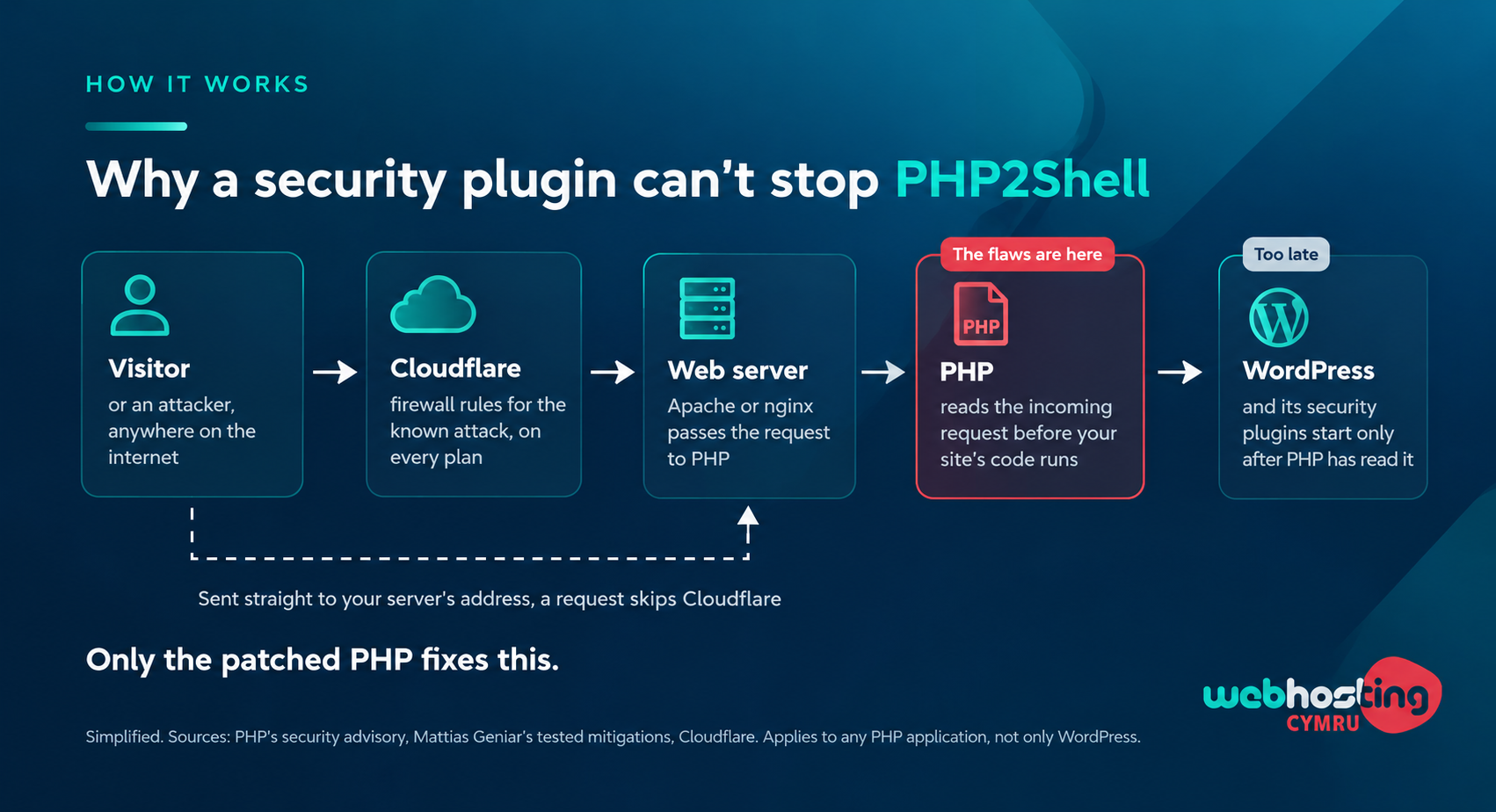
Why a security plugin can’t stop PHP2Shell. Tap to enlarge.
PHP’s supported versions page shows that only PHP 8.2 and newer still get security fixes, and those are the versions PHP has released fixes for. For 7.4, 8.0 and 8.1, which reached end of life before this, PHP published source patches for anyone who builds PHP themselves. Older versions get nothing from PHP, though some vendors have backported the fix even to those. According to W3Techs, which surveys over 20 million websites, about half of sites running PHP use version 8.1 or older.
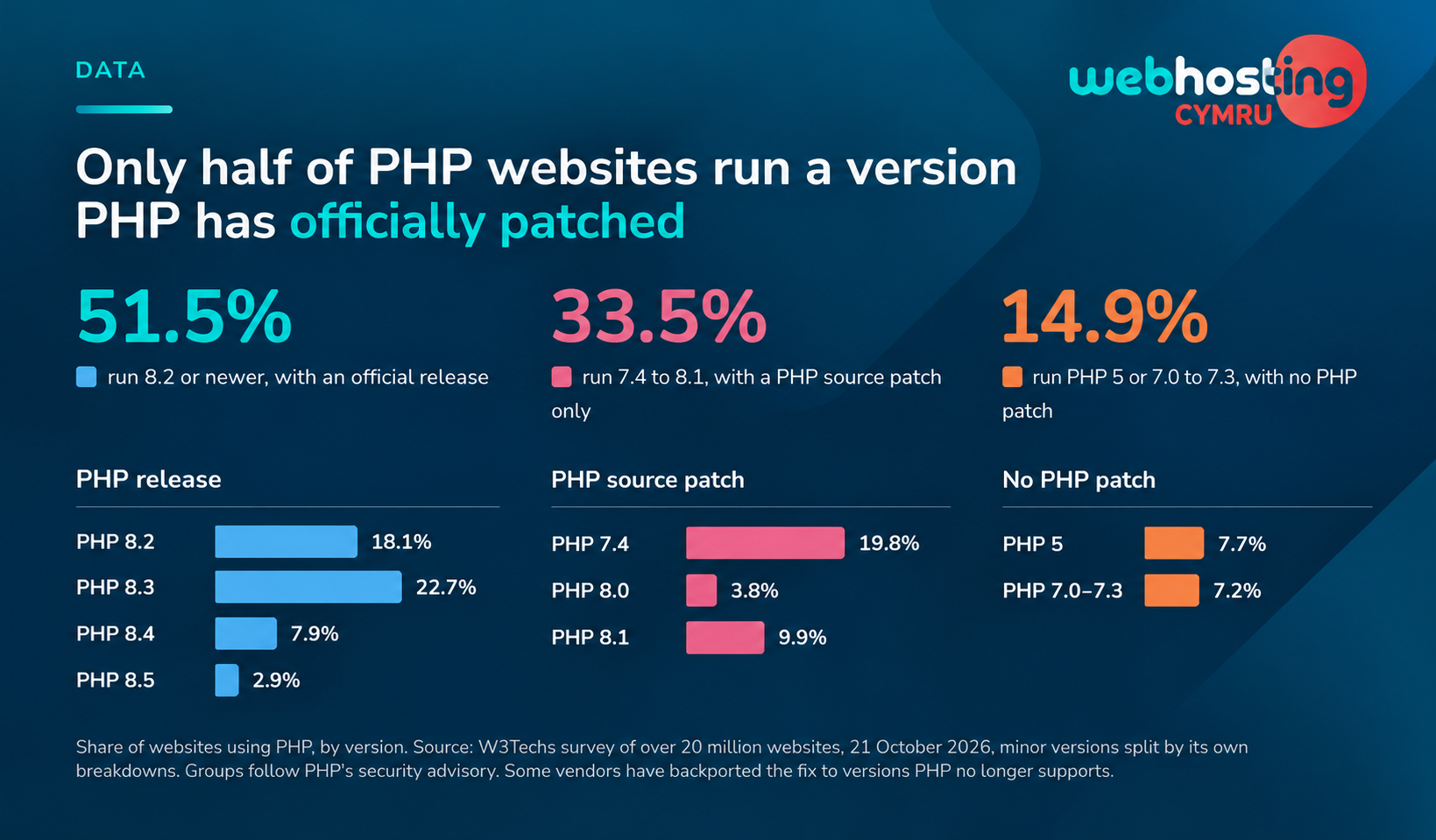
PHP versions in use across websites running PHP, according to W3Techs. Tap to enlarge.
If your website is hosted with us
If you’re on our web hosting, reseller hosting or other shared hosting, patching PHP is our job, and you don’t need to install anything. On our shared and reseller cPanel servers, every PHP version is patched, PHP 5.6 included. On our shared and reseller Plesk servers, PHP 7.4 and newer are patched, but older versions aren’t. If your Plesk site runs PHP 7.3 or older, contact our support team now. Your sites keep running; only the Plesk control panel login is blocked for the time being.
PHP on our servers comes from our control panel and operating system vendors’ own builds. On cPanel, CloudLinux adds the fix to its own builds without changing the version number, so a site showing 8.4.26 instead of 8.4.27 is still patched.
The one thing left for you is your site’s PHP version. If it’s 8.3 or newer, you’re done. PHP 8.2 is patched today, but its security support ends on 31 December 2026, so plan to move off it before then. If it’s 8.1 or older, move up to 8.3 or newer, even though we’ve patched it this time, because PHP no longer fixes those versions. Test on a staging copy if you can, and take a backup first.
You may also see advice online to block file uploads at the server or to remove PHP’s memory limit. On a hosting account, the first breaks contact forms and checkouts, and the second gains nothing on a server that’s already patched. Leave both to us.
If you’re a reseller
Your clients will look to you first, and many of them won’t know what PHP is. Tell them our servers are patched and where to follow progress, then check which PHP version each client site runs.
On cPanel, moving clients off 8.1 or older isn’t an emergency, because we’ve patched those versions, but plan it, because PHP no longer fixes them. If a client is on Plesk with PHP 7.3 or older, contact our support team now.
WHMCS is on the researchers’ list of applications they confirmed attacks against, so if you run WHMCS for billing, check its PHP version too.
If you run your own VPS
With VPS hosting you have root access, so patching PHP is in your hands. VPS customers manage their own servers, but for this flaw we went further. Where we had access, our team brought most VPS servers onto patched PHP for cPanel and Plesk. To find out whether yours was one of them, ask our support team. Either way, these checks tell you where you stand.
- Check every PHP version on the server. A patched package lists CVE-2026-109618 and CVE-2026-109619 in its changelog or its vendor’s security notice. Its version number may be older than PHP’s, and on Plesk and Webuzo some patched builds change only their build date, to 21 October 2026 or later.
- Update any version that isn’t patched. Use your control panel’s updater or your operating system’s package manager. On Plesk, update Plesk itself too, because its control panel runs on its own copy of PHP, fixed in Plesk Obsidian 18.0.81 Update 4 and 18.0.80 Update 11.
- Restart PHP. Restart PHP-FPM or the web server, and any long-running PHP process, such as Laravel’s queue workers, so they stop running the old code.
- Check again, then look for signs of attack.
On a cPanel server, the first command lists the installed PHP versions and the second checks one of them. Change ea-php84 to match each version in turn. If the second prints nothing, that version doesn’t have the fix yet.
rpm -qa 'ea-php*-php-cli'
rpm -q --changelog ea-php84-php-cli | grep -E 'CVE-2026-(109618|109619)'
For other setups, follow your vendor’s own notice from CloudLinux, Plesk, Webuzo, Debian or AlmaLinux.
If you can’t update straight away, PHP’s advisory lists stopgaps that reduce exposure without making a server safe. Use them only on your own server and only until you’ve patched. Set them in php.ini or the PHP-FPM pool, because ini_set() and .user.ini don’t work for this, then restart every worker.
- Remove the PHP memory limit, only if you can’t patch yet. PHP calls
memory_limit=-1the primary mitigation for CVE-2026-109618, but without a limit one runaway script can use all of the server’s memory. Cap memory with a container or cgroup limit instead, and restore a normal limit after patching. - Turn off upload progress.
session.upload_progress.enabled=0blocks only the confirmed session routes for CVE-2026-109619. - On PHP 8.5, turn off fatal error backtraces with
fatal_error_backtraces=0.
The advisory also suggests lower request limits, and blocking multipart requests at the web server for sites that take no file uploads. If you’d rather take a site offline, stop the web server, not just the PHP handler. In Mattias Geniar’s tests, switching off only the handler left the site’s code readable by anyone.
Advice to ignore
Some advice circulating on social media is wrong.
- That only the php-cgi handler is affected. PHP lists every common setup as at risk.
- That you should block every request carrying PHP’s session cookie. That would lock out every logged-in visitor and every shopper with a basket.
- That the flaws are rated 10 out of 10. PHP rates both 9.2 on the CVSS v4.0 scale.
- That a failed test of the public exploit means you’re safe. It doesn’t.
Security researcher Christopher Kunz reported that the public exploit didn’t seem to work against standard PHP-FPM on Ubuntu. Yet PHP confirmed one route against PHP-FPM, and Calif says the flaws are always exploitable under default configurations, so a failed test tells you nothing.
After the patch
Patching closes the hole but doesn’t remove anything an attacker planted before it closed. A clean log isn’t proof either, because PHP warns that CVE-2026-109619 can be exploited without a predictable log entry. Amazon recommends looking back to 17 October, the date of its first recorded attempt, though it’s unclear whether any attempt it saw would have worked.
Look out for files or admin accounts you don’t recognise, and for redirects you didn’t set up. Restore from a backup only if you find signs of compromise, and use one from before 17 October, accepting that newer orders and posts will be lost. If you’re hosted with us and unsure, contact our support team.
On your own server, Amazon and Wiz suggest looking for POST requests containing PHP_SESSION_UPLOAD_PROGRESS, and for file uploads followed by memory limit errors or bursts of 500 errors. PHP workers restarting for no clear reason are worth a look too. None of these proves an attack on its own.
If you find signs that an attacker got in and could have reached customer data, such as orders in a shop, UK GDPR may require you to report it. The ICO says that if a breach is likely to result in a risk to people’s rights and freedoms, you must tell it as soon as possible and, where feasible, within 72 hours.
How PHP2Shell unfolded
The story moved from a leak to reported attack attempts in under a day, and patched builds followed through the night. All times are UK time.
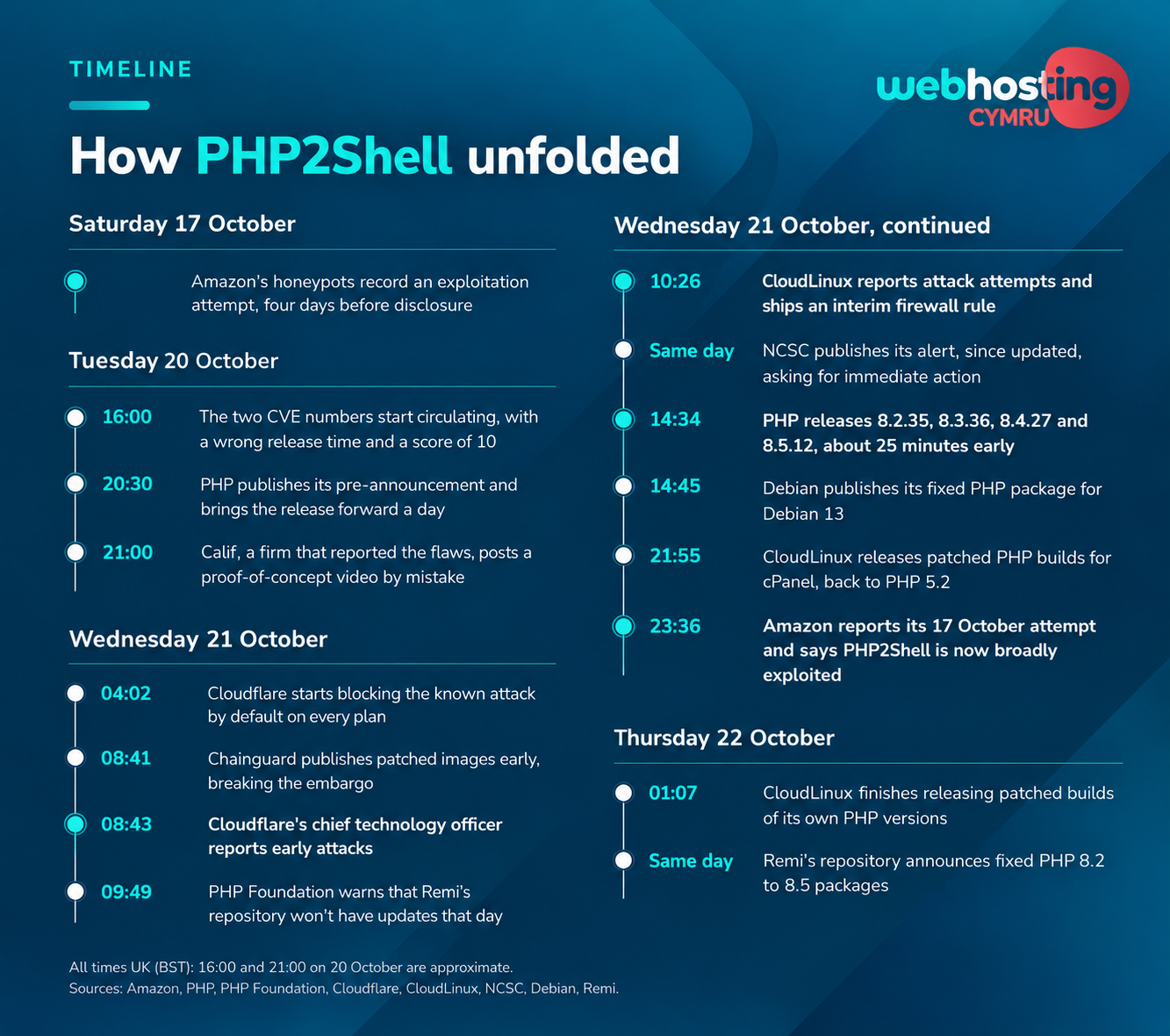
PHP2Shell, from the first recorded attempt to the vendors’ fixes. Tap to enlarge.
Common questions
What is PHP2Shell?
PHP2Shell is the name for two critical flaws in PHP, CVE-2026-109618 and CVE-2026-109619, that can let an attacker run code on a web server without logging in. PHP fixed them on 21 October 2026. They’re in PHP itself, so they affect WordPress sites and most other PHP software.
Which PHP versions fix PHP2Shell?
PHP 8.2.35, 8.3.36, 8.4.27 and 8.5.12. PHP 8.1 and older get no official release, but some vendors have backported the fix, even to PHP 5, and their patched builds may keep a lower version number. Check the package changelog or ask your host.
How do I check my PHP version?
Your hosting control panel shows it, where to look. In WordPress, go to Tools, then Site Health, open the Info tab and expand Server.
Is my WordPress site affected?
Yes, unless its server runs a patched PHP, meaning 8.2.35, 8.3.36, 8.4.27, 8.5.12 or a vendor build carrying the fix. PHP handles every request before WordPress loads, so your WordPress version makes no difference here.
Will a security plugin protect me?
Not from this. A security plugin runs inside WordPress, which only starts once PHP has read the request, and the attack can happen during that reading. Keep it anyway for the attacks it was built for.
I’m on shared hosting. Do I need to do anything?
Patching PHP is your host’s job, so check with them that your PHP version is covered. If you host with Web Hosting Cymru, every version is patched on cPanel, and PHP 7.4 and newer on Plesk. If your Plesk site runs PHP 7.3 or older, contact our support team. Either way, move to PHP 8.3 or newer when you can.
Is Cloudflare enough?
Not on its own, but it helps until you’ve patched. Cloudflare blocks the known attack by default on free and paid plans, though only for traffic that passes through Cloudflare. On a paid plan, make sure its managed rules are set to block, since log mode only records attacks.
Should I take my site offline?
Only if its PHP can’t be patched and you can live with the downtime, which matches the NCSC’s advice. On Web Hosting Cymru’s shared servers, PHP is already patched. On your own server, stop the web server or serve a maintenance page for every request. Switching off only the PHP handler can leave the site’s code readable.
Do I need to change my passwords?
Change them if you’ve seen signs of compromise. That means your database and admin passwords, any API keys, and on WordPress, the security keys in wp-config.php. A site that ran unpatched PHP can do the same as a precaution, because Wiz says the flaws can expose data held in server memory, which may include credentials. Visitors don’t need to do anything.